Grants Planning Tool
The Grants Planning Tool will assist you to take a strategic approach to grantseeking, helping you…
The Funding Centre keyword field helps you refine your search using Boolean logic, allowing grantseekers to control how keywords are combined to find relevant grants.
The Funding Centre Keyword field uses Boolean logic. Many of your will be familiar with search engines that employ this logic, but mightn't have come across the name before. This help sheet outlines how it works to help you get the most from the Funding Centre's powerful search engine.
By default, the Funding Centre treats multiple keywords as OR, meaning it will return results that include any of the words you enter. However, you can refine your search further by using:
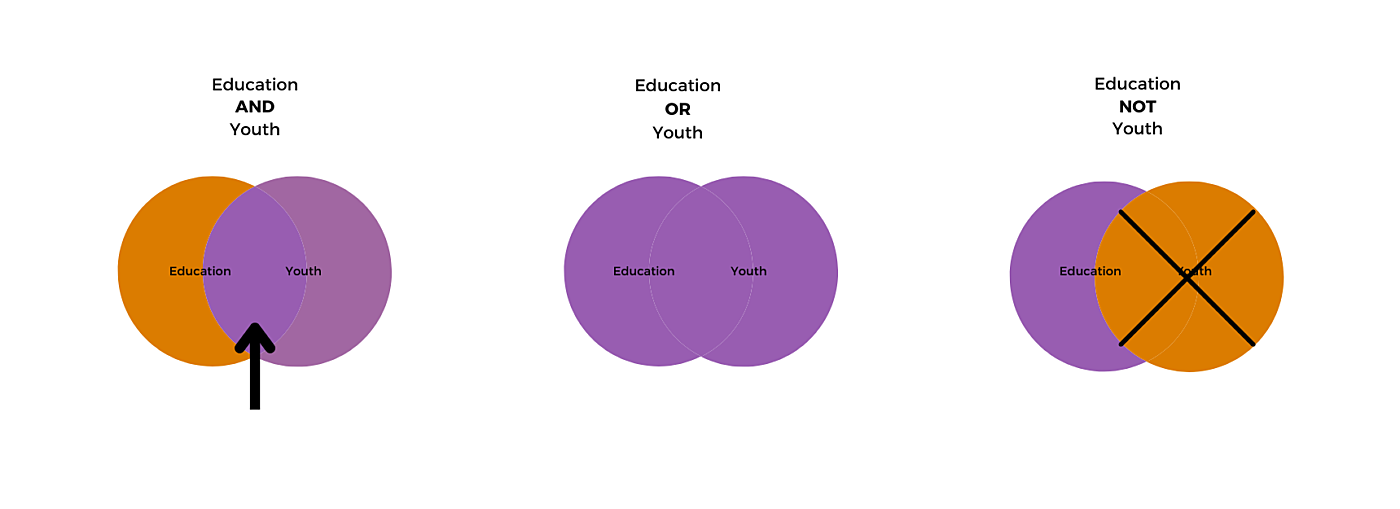
In the Funding Centre, the default Boolean behaviour is OR. For example, the keyword search [Youth Development] will return results for grants that contain either youth, development, or both. The result would be the same if you entered the search term [Youth OR Development].
Use AND if you want to enforce all keywords entered to appear in the results. For example [Homelessness and housing AND Women] will return results for grants that contain both Homelessness and housing and Women (not one or the other).
Use double quotations for an exact match and order. For example: "Community garden”.
If you want to exclude a keyword, use NOT. For example: [Community NOT Garden].
The Grants Planning Tool will assist you to take a strategic approach to grantseeking, helping you…
The Grantseeker's Template will help you collect and keep track of all the important documents and…
Each grantmaker may request you submit your grant budget in a different format. The Example Grant…